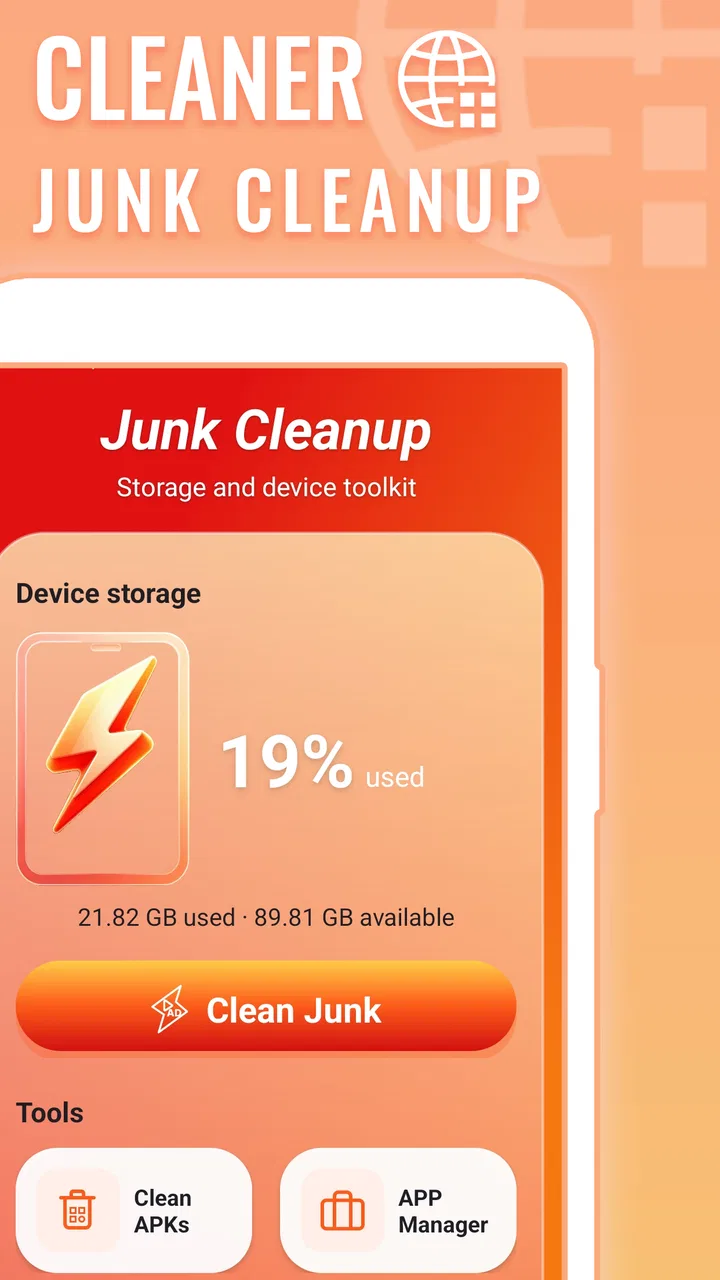
Cleaner: Junk Cleanup
- 3.7
- Rating
- 100.00K
- Installs
- Free
- Price

 Analysis by App-foxy
I spent time with Cleaner: Junk Cleanup as a small storage-management tool rather than treating it like a feature-packed maintenance suite. Its purpose is easy to understand: help remove unwanted files and recover space on a device. That narrow focus is useful when a phone feels crowded and I want a direct place to start, but it also means the experience needs to be judged by clarity, control, and confidence rather than by a long list of extras.
The app comes from HANFU GIRL and sits in the tools category. It is free to use, carries an Everyone age rating, and is currently at version 1.0.0. I found its basic idea approachable for people who do not want to learn a complicated storage system, especially when the immediate problem is simply “my phone is full.” The more important question is whether that simplicity remains comfortable for people using different screen settings, input methods, attention levels, or physical environments.
How Cleaner: Junk Cleanup feels to use in everyday situations
I find the everyday value of Cleaner: Junk Cleanup depends less on tapping quickly and more on choosing the right moment to tidy up. Before a trip or a large download, I’d use it as a prompt to review storage while I have time and attention, rather than waiting until a warning makes me rush. That small change in timing can make a cleanup feel more deliberate and less stressful.
You May Also Like

 AccuWeather: Weather Radar
AccuWeather Review: A Quick, Clear Forecast for Everyday Decisions
For everyday plans, the best forecast is the one you can understand quickly. AccuWeather makes rain timing, radar, and local conditions easy to act on, with a few trade-offs.

 Hill Climb Racing
Why Hill Climb Racing Still Turns Crashes Into One More Run
A tiny car, a bumpy hill and one more upgrade: Hill Climb Racing keeps resurfacing because its simple chaos makes every near-miss feel personal.

 AliExpress - Shopping App
AliExpress Makes Global Shopping Feel Personal, but Shoppers Bear the Risk
AliExpress turns a global marketplace into a pocket-sized discovery engine. Its reach is useful, its shopping loop compelling, and its trade-offs easy to miss.

 Lords Mobile: Kingdom Wars
Lords Mobile Is a Kingdom-Building Routine, Not a Quick Match
A case-by-case verdict on the building, battles, device demands, and social commitments that make Lords Mobile rewarding for some players and exhausting for others.

 PDF Scanner app - TapScanner
TapScanner Makes Paperwork Easier to Capture, Check, and Share
TapScanner makes scanning with a phone feel less like a rescue operation and more like a dependable step in getting work done. Its capture tools are useful, though not flawless.

 Block Blast!
 Shows How Much a Puzzle Game Can Leave Out
A quiet grid game shows why puzzle players increasingly value instant clarity, repeatable skill and low-pressure play—and where the genre still needs to catch up.
More From Our News Desk
View All News


Readable navigation makes the first step straightforward
The strongest part of the experience is the directness of its job. A person opening a cleaner app usually wants to know what can be removed and how much room might be recovered, not read a technical explanation about file systems. Cleaner: Junk Cleanup is best understood as a focused starting point for that task. Its short store description, “Cleaner,” matches that uncomplicated role, and the longer summary points clearly toward junk removal and storage cleanup.
That simplicity can help users who find crowded interfaces tiring. Someone with limited technical confidence may be more comfortable with a tool that stays centered on cleaning instead of mixing storage analysis with battery controls, network tests, device diagnostics, and promotional dashboards. In my experience, a focused utility is easier to approach when I am already frustrated by a warning that storage is nearly full.
There is also a useful distinction between readable navigation and genuinely informative navigation. A clear cleaning action is only half the job. Before removing anything, I want to understand what the app has identified, whether the items are temporary, and whether a selected category might contain something I still need. That is where I would slow down and inspect the results rather than treating a large cleanup suggestion as an instruction to approve everything.
For readers who rely on larger text or display magnification, the practical test is whether labels remain understandable when the phone is configured for comfortable reading. A cleaner should not depend on tiny secondary text to explain what will happen. If important distinctions become hard to see after increasing text size, the app becomes less friendly even if its default screen looks simple. I recommend checking the review screen carefully and avoiding a one-tap habit until the categories make sense to you.
The app has reached over fifty thousand installs and holds a 4.1 average from around one hundred sixty ratings. Those figures suggest that it has attracted a meaningful early audience, while also leaving room for individual experiences to vary. I would not use the rating alone to decide whether it is suitable for someone with specific accessibility needs; the more useful measure is how comfortably that person can identify, review, and confirm a cleanup.
Motor and sensory considerations before confirming a cleanup
Storage maintenance can look easy but still create pressure for people with motor difficulties. A small confirmation control, closely spaced choices, or a gesture that requires precision can turn a simple task into a frustrating one. My advice is to treat the selection screen as the critical part of the workflow. The initial scan may be effortless, but the point where files are selected or deleted deserves slower, deliberate interaction.
Users with tremors, reduced dexterity, or difficulty holding a phone steady may prefer using the device on a flat surface and taking one action at a time. That is not a special trick for this app so much as a sensible way to reduce accidental taps during any destructive task. If the phone supports an alternative input method, such as a stylus or switch control, it may make review and confirmation more manageable, although the comfort of that setup will depend on the device and operating system.
People who are sensitive to visual clutter may appreciate the app’s narrow purpose, but cleaning interfaces can still become stressful when they emphasize urgency. A nearly full storage message can make users rush. I think the safer approach is to pause, read the item group, and decide whether the recovered space is worth the risk of removing it. The benefit of a cleaner is not just speed; it is making a storage decision with enough information to feel safe.
For users with low vision, contrast and text size matter more than decorative presentation. I would keep the phone’s display at a comfortable brightness, use the operating system’s magnification or text settings when needed, and avoid relying on color alone to distinguish selected and unselected items. If a status is communicated only through a subtle shade, that can be difficult to interpret. A visible label or clear change in control state is much easier to trust.
For users who are deaf or hard of hearing, a visual workflow is preferable because it does not depend on an alert being heard. Likewise, people with cognitive disabilities may benefit from completing the job in a quiet setting, with notifications minimized and enough time to read each step. Cleaning is not an emergency. The app is most useful when it supports a calm decision rather than encouraging a hurried tap.
Situational access: when a quick cleanup is genuinely helpful
A realistic example is a person preparing to record a long video, download an offline map, or install an important system update. The phone reports low storage, and there is no time to sort every folder manually. In that situation, Cleaner: Junk Cleanup can serve as a focused first pass. I would open it, review the suggested material, remove only what I recognize as unnecessary, and then check the phone’s available space before attempting the original task.
Another useful situation is helping a family member who finds the device’s built-in storage menus confusing. A dedicated tool may give them a more approachable route into the problem. I would still stay nearby for the first cleanup, not because the app is inherently unsafe, but because deleting files is a task where a second pair of eyes can prevent confusion. This is especially important if the person has difficulty reading small labels, remembering what was recently downloaded, or distinguishing personal files from temporary material.
Travel is another context where storage pressure becomes inconvenient. Photos, translation resources, tickets, and maps can accumulate quickly, while a user may be working with limited connectivity or a low battery. A cleaner can be useful before leaving home, when there is time to review results. I would not wait until standing in an airport or on a roadside, where glare, noise, stress, and poor attention make a destructive action harder to evaluate.
The tool may also help someone who prefers a single maintenance routine. For example, I might use it before backing up photos, then confirm that the backup is complete before removing anything related to that workflow. The important trade-off is sequence: cleanup should follow a backup or a clear decision about what is disposable, not replace one. A storage app cannot make an irreplaceable personal file safe to delete merely because it appears unnecessary at a glance.
Situational access also includes language and technical confidence. The app’s basic purpose is easy to explain to a friend, which is valuable for people who do not enjoy technical terminology. However, simple wording should not be confused with permission to skip the review stage. If someone cannot comfortably understand the cleanup categories, the better option may be the phone’s built-in storage screen or help from a trusted person.
Where it fits beside built-in storage tools and larger cleaners
Most Android phones already include some form of storage management. Those built-in tools have an important advantage: they are part of the operating system and are often placed near the settings people already use. For a user who wants maximum familiarity or who is cautious about installing a separate utility, the system option may be the better choice. It can also be easier to connect storage decisions with installed apps, downloads, and device settings in one known environment.
Cleaner: Junk Cleanup makes more sense for someone who wants a dedicated, less technical entry point. Its value is not that a separate cleaner automatically understands personal priorities better than the operating system. Its value is the possibility of a simpler cleaning-focused workflow. I would choose it when the built-in menu feels buried or confusing, and choose the built-in option when I need broader control over exactly where space is being used.
More elaborate cleaning apps often add duplicate-photo detection, large-file sorting, app management, memory tools, or security features. Those additions can be useful, but they also increase the number of decisions and permissions a user may need to understand. Cleaner: Junk Cleanup is easier to recommend to someone who wants to begin with junk removal rather than manage an entire device from one dashboard.
The trade-off is depth. A person who regularly organizes media, compares duplicate images, moves files to cloud storage, or audits large downloads may outgrow a focused cleaner. In that case, a file manager or the phone’s own storage analyzer may give better visibility. I would not install this app expecting it to replace a complete personal file-organization system.
Remaining barriers and the limits of a simple cleaner
The first barrier is trust. Deleting files is consequential, and a friendly interface does not remove that responsibility. I would like every user to develop a habit of checking the proposed items before confirming. This matters particularly for shared phones, devices used for work, or phones belonging to people who store important documents locally.
The second barrier is the difference between technical simplicity and accessibility. A short path is helpful, but it does not automatically solve problems caused by small controls, weak visual distinction, unclear status changes, or an interaction that requires precise tapping. People who depend on screen readers, switch access, magnification, or unusual input configurations should test the core scan-and-review flow carefully before relying on it for regular maintenance.
The third barrier is context. A person with limited storage may be tempted to clean repeatedly without addressing the real cause, such as a large video collection, offline downloads, or an app that continually recreates temporary files. A cleaner can provide relief, but it may not explain why space keeps disappearing. If the same warning returns soon afterward, I would investigate storage usage through the operating system instead of repeating deletion blindly.
Version 1.0.0 also sets an expectation of a relatively early product experience. That does not make it unusable, but it makes cautious testing sensible. I would begin with a small cleanup, observe whether the results are understandable, and keep important backups current. The free price lowers the barrier to trying it, yet free should not be mistaken for risk-free: the user still needs to review every destructive action.
There are also people who should skip it. If you already understand your device’s storage settings and prefer precise folder-by-folder control, a file manager may serve you better. If you need advanced duplicate handling, media organization, or detailed explanations of every storage category, a more specialized tool is likely a better match. And if accessibility depends on a particular control arrangement that the app does not present comfortably, the built-in settings or a trusted manual workflow may be the more inclusive choice.
An inclusive verdict for practical storage cleanup
I see Cleaner: Junk Cleanup as a focused, approachable tool for users who want help starting a storage cleanup without navigating a broad maintenance suite. Its strongest appeal is the straightforward purpose, free access, and low technical barrier. It can be useful before a download, recording session, trip, or backup, provided the user treats the review stage as essential rather than optional.
For inclusive use, I would recommend a slow first session: enlarge text if needed, increase display comfort, use an alternative input method when helpful, and complete the process in a quiet place. Ask a trusted person to review the first cleanup if reading, memory, or precise tapping is difficult. Those steps do not guarantee that every interaction will suit every ability, but they make the decision process more controlled.
My final view is positive but measured. The app is a reasonable choice for someone who wants a simple junk-cleaning companion and does not need detailed file management. It is less suitable for people seeking advanced organization or absolute control over storage categories. The best way to use it is as a careful first pass, not as an automatic permission to delete. Used that way, Cleaner: Junk Cleanup can reduce the friction around a common phone problem while leaving the final decision in the user’s hands.
It is available for Android devices running version 10 or later, and its Everyone rating makes it broadly approachable from an age standpoint. I would still judge suitability by the individual’s ability to read the results, operate the controls, and understand what will be removed. For that reason, my recommendation is strongest for users who value a simple route to cleanup and are willing to pause before confirming each action.
FAQs for Cleaner: Junk Cleanup
01What is Cleaner: Junk Cleanup used for?
Cleaner: Junk Cleanup is designed to help organize and maintain storage on your Android or iOS device. It typically scans for unnecessary files, duplicate or similar photos, large videos, cached data, and other items that may be taking up space. Before deleting anything, review the suggested files carefully, because some items identified as junk may still be useful to you.
02Is Cleaner: Junk Cleanup safe to use?
The app can be useful for identifying files that may no longer be needed, but its safety depends on the permissions you grant and the items you choose to remove. During testing, the most important step was checking every cleanup category before confirming deletion. Avoid granting unrelated permissions, and keep a backup of important photos, videos, and documents before using automatic cleanup tools.
03Can Cleaner: Junk Cleanup delete important photos or files?
Yes, there is a possibility if you approve the wrong recommendations. Cleaner applications often group duplicate, similar, blurry, or large files together, and automated suggestions are not always perfect. Carefully preview the results, deselect anything you want to keep, and check folders such as messaging apps, downloads, and cloud-synced albums before permanently deleting content.
04Does Cleaner: Junk Cleanup really improve phone performance?
The app may improve available storage and make a device feel less cluttered, especially when the phone is nearly full. However, it should not be viewed as a guaranteed performance booster. Removing unnecessary files can help with storage-related slowdowns, but it will not fix aging hardware, battery problems, system issues, or apps that are poorly optimized.
05Is Cleaner: Junk Cleanup free, and does it include subscriptions?
Availability of features may vary depending on the platform, region, and version installed. Basic scanning or limited cleanup tools may be available without payment, while advanced functions can require advertising support, a one-time purchase, or a recurring subscription. Before starting a trial or confirming payment, review the pricing, renewal terms, and cancellation process shown in the app store.
Pros
- Quickly identifies cached files
- duplicates
- and other storage clutter.
- Simple interface makes routine phone cleaning easy for most users.
- Can help free space when your device is running low on storage.
- Useful tools for finding large files that are easy to overlook.
- Cleaning categories make it easier to review unwanted content first.
Cons
- Some features may be restricted to a premium subscription.
- Aggressive cleanup suggestions can require careful manual checking.
- Results may vary depending on device model and Android version.
- Frequent notifications or upgrade prompts may feel intrusive.
- Cleaning junk will not significantly improve performance on every phone.

Cleaner: Junk Cleanup
Gallery